
Direct Answer: After Windows, macOS, or Linux reserves ~3 GB to 3.5 GB, 32 GB of RAM gives you ~28.5 GB to 29 GB of local LLM working memory. That comfortably runs 7B–8B models at lossless Q8_0 (64K+ context), 12B–14B models at Q6_K / Q8_0 (32K+ context), 26B–27B models at Q5_K_M, and near-frontier 30B MoE and 32B dense models at 4-bit Q4_K_M (~24.5 GB to 27.7 GB total working memory at 8K–16K context). However, speed depends on memory bandwidth: a single 32 GB CPU-only PC runs dense 32B models at 3–6 tokens/sec, whereas pooling a 12 GB RTX 3060 PC + 16 GB Apple Silicon Mac via the RAMDeck Hardware Hub ($199) streams 30B–32B class models at 28 to 39 tokens/sec!
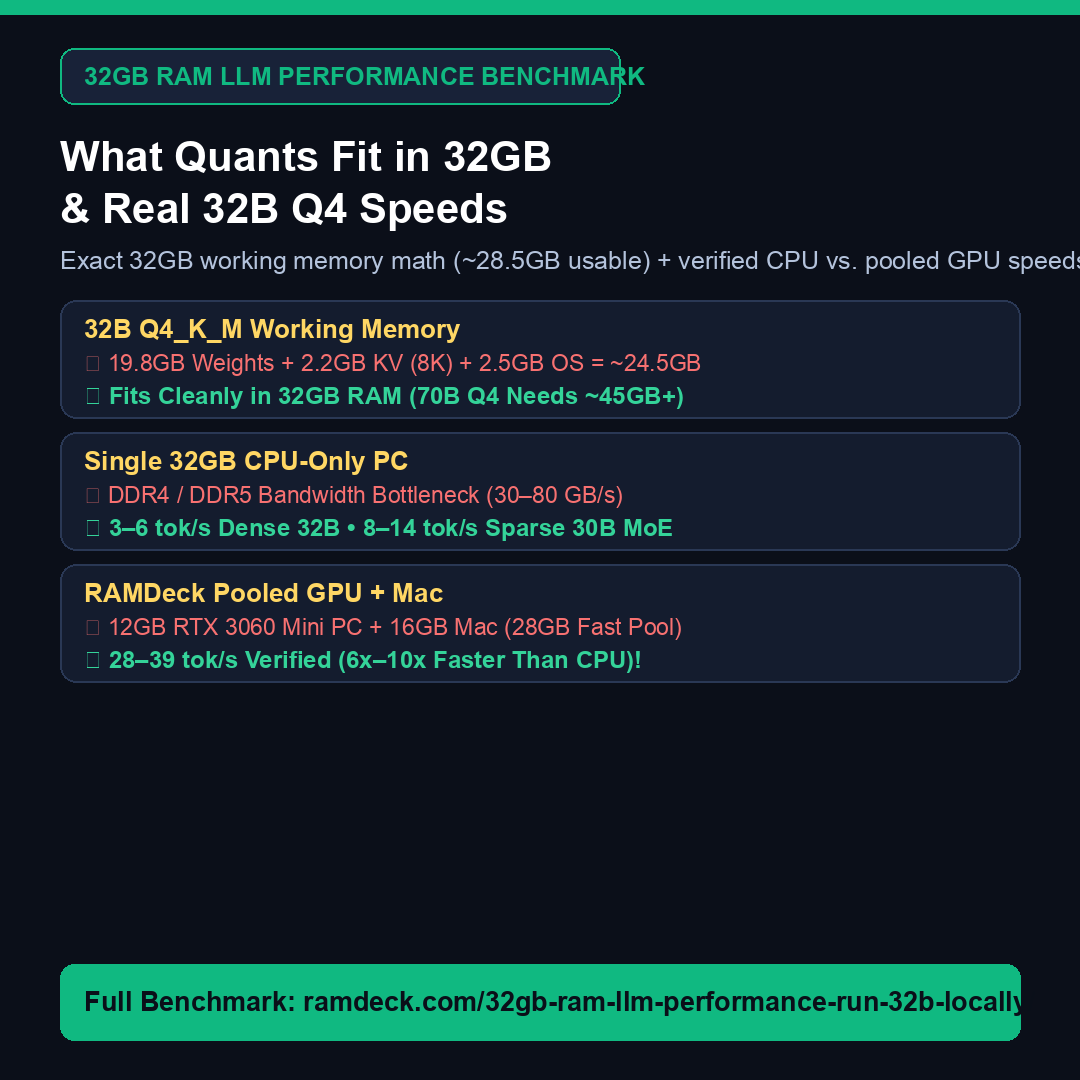
Exact 32GB Local LLM Working Memory Breakdown (Running 32B Q4 on 32GB RAM)
- 32B
Q4_K_MGGUF Model Weights: ~19.8 GB (or ~18.0 GB for 30B MoE coding models). - Context Window KV Cache: ~2.2 GB at 8K tokens (~4.4 GB at 16K tokens; ~2.9 GB at 32K with Q8 KV quantization).
- OS + Runtime Graph Overhead: ~2.5 GB to 3.5 GB.
- Total Working Memory: ~24.5 GB to 27.7 GB—fitting cleanly inside 32 GB without touching slow SSD swap, while dense 70B
Q4_K_Mmodels (~45 GB+) require either 64 GB+ or adding a third 16 GB laptop to your RAMDeck pool (48 GB total).
Explore the full 8B–70B quantization table and live video benchmarks in 32GB RAM LLM Performance & How to Run a 32B LLM Locally and calculate your exact setup in the Interactive Local LLM RAM Calculator.
— The TradeMAV Team
Trademark Notice: TradeMAV™ is a trademark of TradeMAV LLC. All third-party product and model names, including Qwen, DeepSeek, Gemma, Llama, LM Studio, Ollama, VS Code, Cursor, Continue.dev, Apple, Mac, iPhone, Windows, Linux, Android, and Tailscale, are trademarks or project names of their respective owners, which are not affiliated with, sponsoring, or endorsing RAMDeck or TradeMAV LLC.




Leave a Reply